The Cost of Fragmented Financial Intelligence
Wealth management is a data-intensive discipline — relationship managers need to synthesize a client's portfolio allocation, recent market movements, risk exposure, and personal goals before every interaction. In practice, this meant opening four different platforms, exporting Excel files, and spending the better part of an hour piecing together a coherent picture.
This wasn't a software problem. It was a cognitive load problem. The data existed. The insights didn't — not in any accessible form. AI Navigator was built to close that gap.
Design premise: The most powerful financial AI isn't one that replaces the advisor's judgment — it's one that removes every barrier between their question and the answer they need to serve a client well.
Three core goals
- Data Simplification — collapse fragmented client data and market indicators into a single, readable narrative
- Decision Velocity — reduce manual portfolio analysis time from hours to seconds through conversational AI
- Fluent Insights — bridge the gap between raw financial metrics and clear, actionable language
The product context
AI Navigator is an embedded feature within WMS — an enterprise wealth management platform serving relationship managers and financial advisors at an institutional level. The AI had to feel native to the existing platform, not bolted on.
The design challenge wasn't just conversation UX — it was integrating an AI layer without disrupting the established workflows of experienced professionals.
Understanding the People Behind the Portfolios
Before any screen was drawn, I needed to understand how financial professionals actually worked — not how they were supposed to work. The gap between documented process and lived behavior is where the real design opportunities live.
Target Users

"I spend 40 minutes before every client call just pulling things together. By the time I'm ready, half my energy is already spent."
- Needs a complete client picture quickly — goals, portfolio health, recent changes
- Less technical; values narrative explanations over raw numbers
- Switches between 3–4 platforms per client meeting prep

"I can read a portfolio in seconds, but explaining what I see to a client in plain language takes longer than the analysis itself."
- Deeply technical; needs speed and precision, not simplification
- Primary pain: translating complex analysis into client-friendly language
- Values control — doesn't want AI that makes decisions, only one that informs
Three Pain Points That Shaped Everything
Fragmented Data Overload
Professionals juggle multiple platforms to build a complete client view. No single source of truth existed — every meeting prep was a manual assembly process.
Manual Analysis Bottleneck
Preparing for a client meeting required extensive manual work — exporting data, opening Excel, cross-referencing market conditions. Time-consuming and error-prone.
Client Communication Gap
Explaining volatile market conditions or portfolio shifts to non-expert clients is difficult. Mistakes in translation damage trust — and trust is the product in wealth management.
What this meant for design
Every pain point pointed to the same root cause: intelligence was trapped in data. The AI's job wasn't to add more information — it was to make existing information instantly legible and actionable.
One Question That Focused Everything
"How might we help financial professionals quickly understand client financial conditions and market situations in a more intuitive and efficient way?"
This HMW statement did a specific job: it ruled out solutions that only solved part of the problem. "More data" wouldn't help — the data was already there. "Better dashboards" wouldn't help — the issue was synthesis, not display. The answer had to be a new mode of interaction entirely.
What "intuitive" means in an enterprise context
For a consumer app, "intuitive" means obvious to a first-time user. For a wealth management platform used daily by trained professionals, "intuitive" means it fits the mental model they already have — asking questions the way they already think about client portfolios, receiving answers that match the language they'd use in a client meeting.
This distinction shaped every conversation design decision: responses aren't written for general audiences. They're calibrated for people who know what IHSG and YTD and basis points mean — and who need that information fast.
Three Interaction Models, One Coherent Experience
The ideation phase surfaced three distinct ways the AI could add value — and crucially, why each was worth building as a distinct pattern rather than folding everything into a generic chat interface.
AI as Financial Co-Pilot
Moving beyond a passive dashboard — the AI proactively surfaces relevant insights before the user asks. Patterns in a client's portfolio that signal risk. Market events that affect their allocation. The advisor stays one step ahead of their clients.
Chat-Based Interaction
Querying complex financial data sets through natural language — without needing SQL, custom reports, or platform-switching. "What's Mira's current portfolio performance vs. her 6-month goal?" becomes a 3-second answer instead of a 15-minute process.
Context-Aware Intelligence
The AI synthesizes live market conditions with a specific client's portfolio allocations to generate advice that's actually relevant to that client — not generic market commentary. This is the hardest problem and the highest-value one to solve.
Why not just build a chatbot? A generic chatbot would have answered questions. What was needed was a system that understood who was asking, what client they were looking at, and what context was already on screen — and could respond accordingly. The three models above each required different data connections and different response formats.
Enterprise AI Design System
The visual language had to do two things simultaneously: feel technically capable (this is serious financial software) and feel approachable (the AI has to invite use, not intimidate). Those tensions shaped every decision — from color to typography to how the AI response card is structured.
Design system foundations
Primary
Neutral
Deep Naval
Blue conveys reliability for interactive AI elements, while Deep Naval creates a distinct visual boundary for conversation surfaces. Neutral tones ensure a clean reading experience for dense data.
Three interfaces, three questions answered
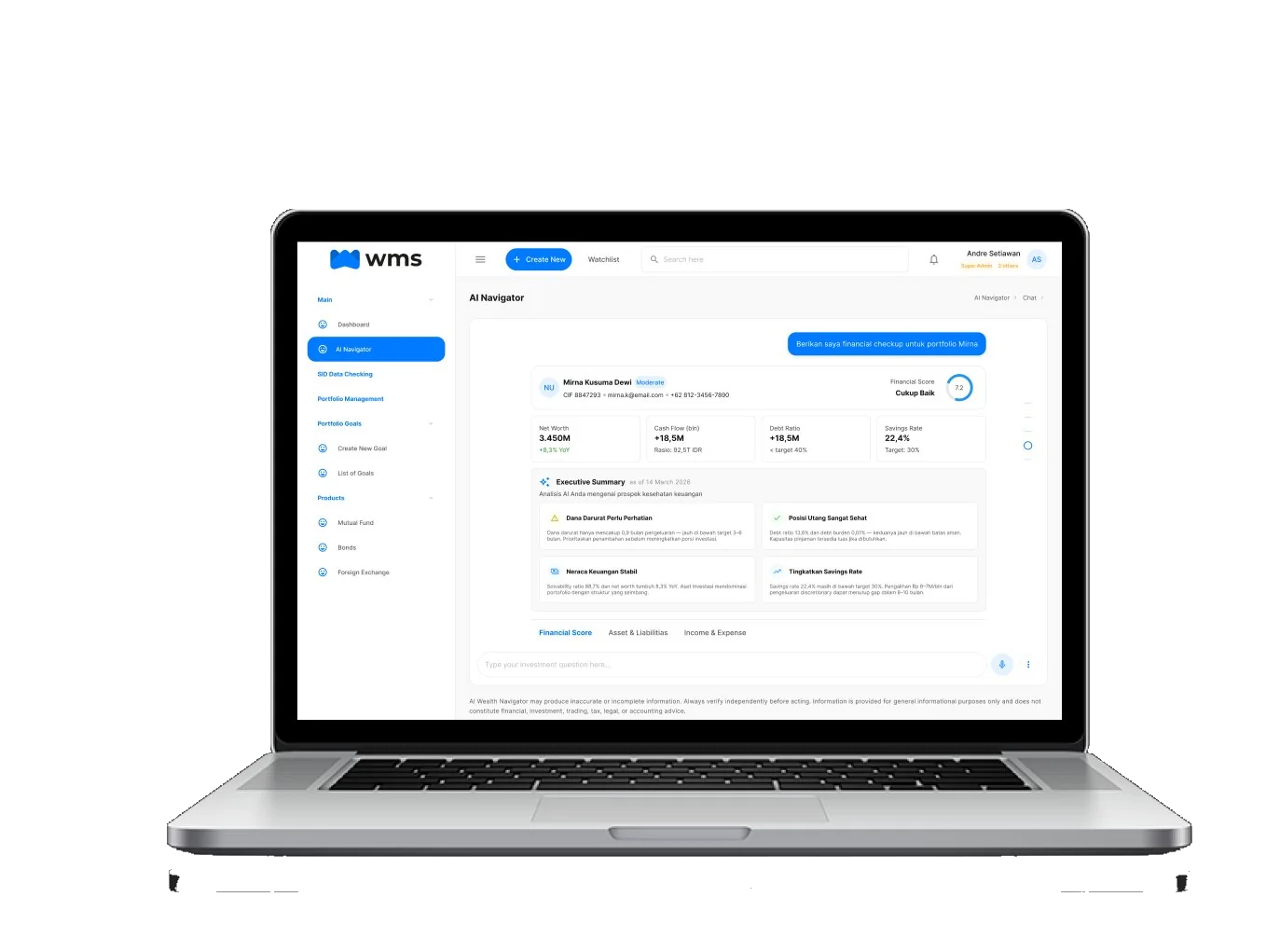
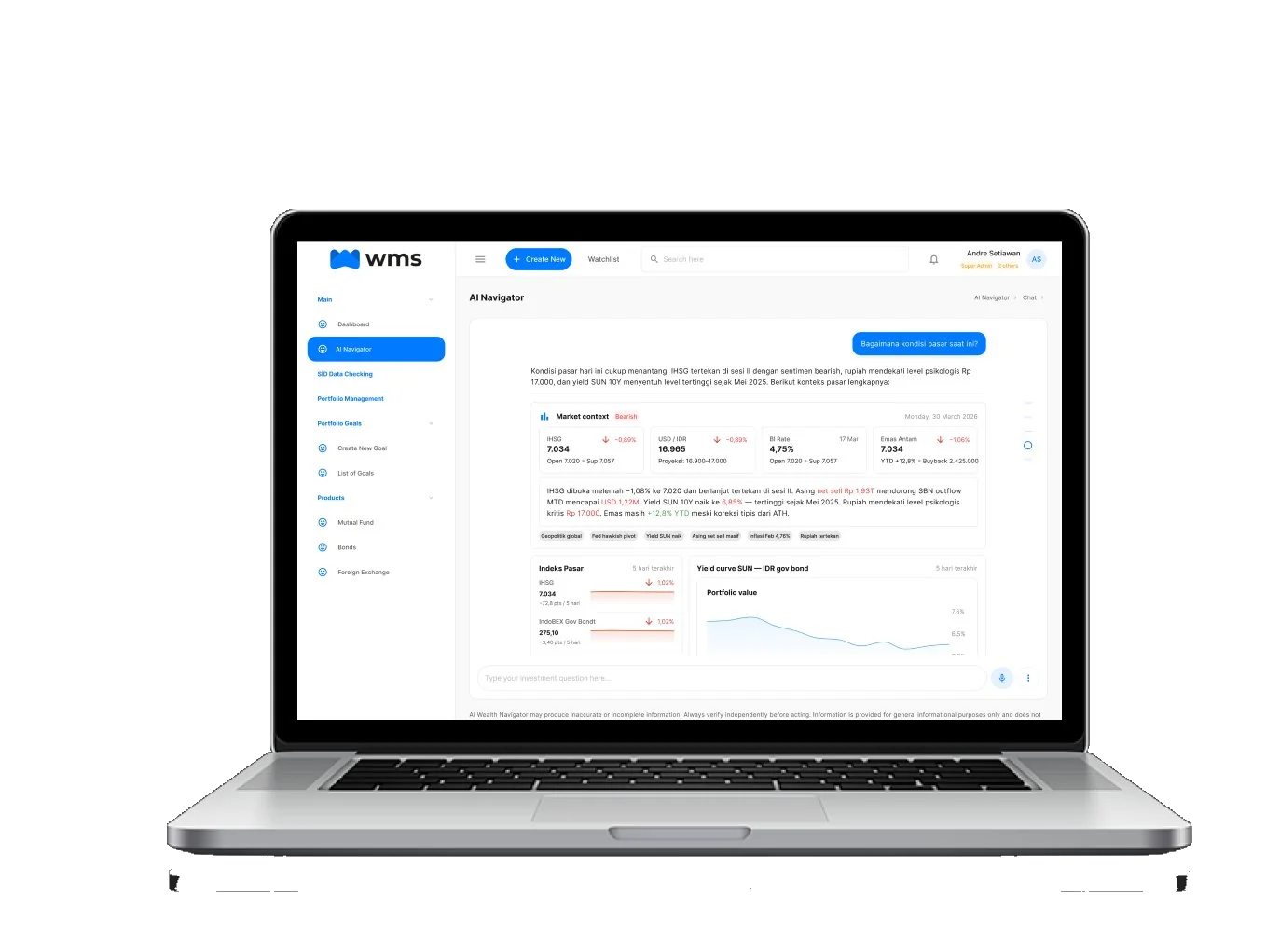
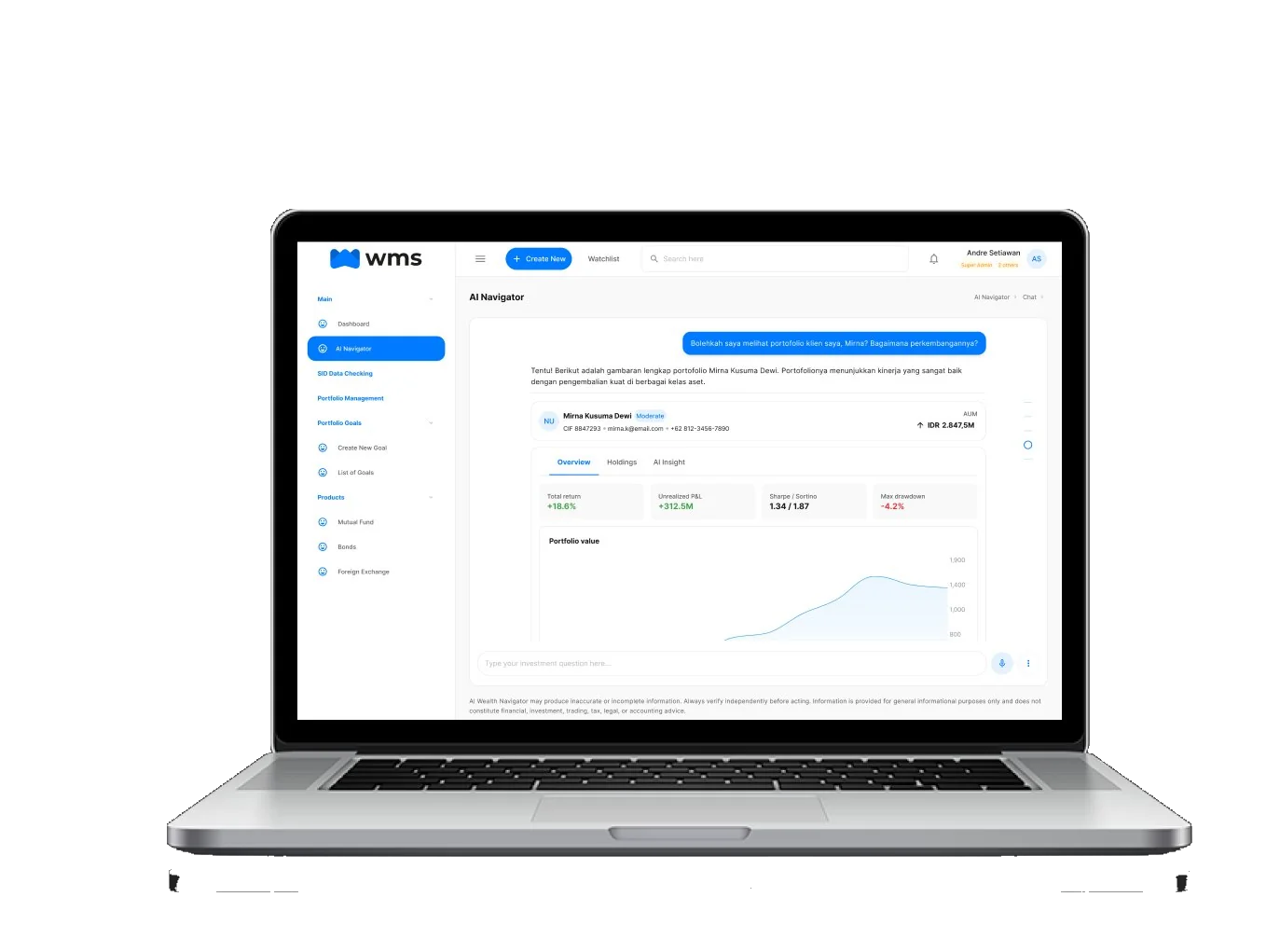
The AI Navigator was designed around three distinct query types — each with a different information architecture, response structure, and follow-up pattern. These aren't three separate features; they're three answers to the same question: what does a financial professional actually need to ask?
Designing the Conversation, Not Just the Interface
Most AI UX work stops at the chat bubble. Real conversation design means thinking about what the AI says, how it says it, and what happens when it's uncertain — because in financial services, a confidently wrong answer is worse than no answer at all.
How a real interaction works
Market context: Bearish · Monday, 30 March 2026
Three things are happening in this one exchange that required explicit design decisions: the AI responds in the user's language (Bahasa Indonesia), it provides structured data with emotional context ("cukup menanatang" — fairly challenging), and it immediately surfaces follow-up actions relevant to what the advisor would naturally want next.
The three AI interaction principles
Prompt-Driven Discovery
Users can ask specific questions about portfolio risks, performance gaps, or market exposure. The AI retrieves and synthesizes — the advisor interprets and decides. Separation of roles was a non-negotiable design constraint.
Suggested Intelligence
Contextual quick-actions surface after each response, anticipating what a professional would naturally ask next. This reduces the cognitive effort of formulating queries and keeps the advisor in flow.
Human-Readable Insights
Complex volatility data, portfolio drift, and market condition shifts are translated into clear, professionally-calibrated language. The AI never oversimplifies for non-experts — it translates for domain experts.
Transparent Limitations
Every AI response includes a disclaimer: "AI Wealth Navigator may produce inaccurate or incomplete information. Always verify independently before acting." This was an intentional trust design choice — not a legal disclaimer buried in fine print, but a visible part of every interaction.
What Was Built and Why It Matters
| Metric | Result | What It Means |
|---|---|---|
| Portfolio analysis time | 40% faster | Pre-meeting preparation cut from ~60 min to under 40 min for a typical client review |
| Interaction models designed | 3 distinct patterns | Prompt-driven, suggested intelligence, and context-aware response — each requiring different UX architecture |
| Design system scope | Enterprise-grade | Full UI system — color, typography, components — built to integrate with the existing WMS platform |
| AI response language | Bilingual | AI responds in the user's input language (Bahasa Indonesia and English) — a conversation design requirement, not a feature |
| Trust architecture | Visible by design | AI limitations surfaced in every response — not hidden in terms of service, actively present in the UI |
What this project changed for me
AI Navigator was the first time I had to design not just for what the interface looked like, but for what the AI would say and when it would say it. Conversation design is a discipline entirely distinct from UI design — the stakes are different, the failure modes are different, and the definition of "clear" is completely different when the content is dynamically generated.
It also reinforced a principle I hold strongly: the best AI features aren't the ones that do the most. They're the ones that do exactly what the user needed, exactly when they needed it — and stay out of the way the rest of the time.